Simple pricing that grows with you
Clear monthly pricing for MSPs managing Microsoft 365 and Azure tenants. Buy through Azure Marketplace, or in Australia and New Zealand through Dicker Data, with editions, funding and a calculator of their own.
Prices in USD, excluding tax. Azure Marketplace bills you monthly in your local currency, converted by Microsoft, and adds local tax.
Premier Suite 25
Up to 2,500 licensed users, then US$8 per 100 users
Excluding tax · billed monthly through Azure Marketplace
Everything you need to run multiple tenants from one portal.
- Centralised management across all tenants
- Automated onboarding and offboarding
- Cross tenant dashboards and reporting
- Proactive alerting by email and SMS
- Contact Sync with your PSA
- B2B API for cross tenant data
- End User Portal with granular rights
- Full audit trail on every change
- Extra users in blocks of 100
Premier Suite 50
Up to 5,000 licensed users, then US$8 per 100 users
Excluding tax · billed monthly through Azure Marketplace
For MSPs growing past 2,500 users who want more out of the box.
- Everything in Suite 25, plus:
- Your own branding, light and dark
- Service Desk Integration with your PSA
- MSP and customer documents
Premier Suite 100
Up to 10,000 licensed users, then US$8 per 100 users
Excluding tax · billed monthly through Azure Marketplace
For MSPs past 5,000 users who want full billing automation.
- Everything in Suite 50, plus:
- Billing automation and accuracy
- CSP and Azure billing
- ConnectWise, HaloPSA, Autotask and Xero
Azure Marketplace add on prices
Add ons are billed through a single meter on your Azure Marketplace subscription, the EcpPro Consumption Unit, at US$0.01 a unit. Each add on uses the number of units shown below every month.
| Add on | Charged | US$ a month | Consumption units | Suite 25 | Suite 50 | Suite 100 |
|---|---|---|---|---|---|---|
| Service Desk Integration Every change recorded against the right ticket in ConnectWise, HaloPSA or Autotask | per MSP | $52 | 5,200 | Add on | Included | Included |
| Your own branding Your logo and colours across the portal, light and dark | per MSP | $20 | 2,000 | Add on | Included | Included |
| B2B API Cross tenant data for your own tools, free on every plan | per MSP | Free | 0 | Included | Included | Included |
| MSP and customer documents Runbooks and client documents in EcpPro | per MSP | $70 | 7,000 | Add on | Included | Included |
| Document storage Storage for MSP and customer documents | per 100 GB | $14 | 1,400 | Add on | Add on | Add on |
| Billing automation CSP and Azure billing to ConnectWise, HaloPSA, Autotask, Xero or CSV | per MSP | $150 | 15,000 | Add on | Add on | Included |
| Automation Workflows Onboarding, offboarding, licence and subscription workflows, one charge for every tenant | per MSP | $52 | 5,200 | Add on | Add on | Add on |
| Compliance: Ad Hoc Policy Check every managed tenant against your security baseline | per managed tenant | $7 | 700 | Add on | Add on | Add on |
| Compliance: Conditional Access Optional module, from January 2027 | per managed tenant | $3.50 | 350 | Add on | Add on | Add on |
| Compliance: Intune Optional module, from April 2027 | per managed tenant | $3.50 | 350 | Add on | Add on | Add on |
| Compliance: Defender Optional module, from July 2027 | per managed tenant | $3.50 | 350 | Add on | Add on | Add on |
| Azure Virtual Desktop AVD sessions and host pools in the same portal | per managed tenant | $15 | 1,500 | Add on | Add on | Add on |
| On Prem AD Management Hybrid clients’ on premises Active Directory | per managed tenant | $35 | 3,500 | Add on | Add on | Add on |
| Signature Management One rate for every active mailbox, set by how many you have | per active mailbox, 1 to 500 | $0.42 | 42 | Add on | Add on | Add on |
| per active mailbox, 501 to 2,500 | $0.40 | 40 | Add on | Add on | Add on | |
| per active mailbox, 2,501 to 5,000 | $0.38 | 38 | Add on | Add on | Add on | |
| per active mailbox, 5,001 to 7,500 | $0.35 | 35 | Add on | Add on | Add on | |
| per active mailbox, 7,501 to 10,000 | $0.31 | 31 | Add on | Add on | Add on | |
| per active mailbox, over 10,000 | $0.27 | 27 | Add on | Add on | Add on |
Prices in USD, excluding tax. Included means the add on is part of that plan at no extra charge. An active mailbox is one that has sent mail in the month.
One meter for every add on
Your Marketplace invoice shows your plan, any extra user blocks, and one line of EcpPro Consumption Units. EcpPro sends you a usage report each month that itemises the add ons behind those units.
Billed in your currency
Microsoft converts the US$0.01 unit price into your local currency, just like your plan price, and adds local tax. A unit counts the same in every country.
A worked example
Premier Suite 25 with Billing automation (15,000 units) and On Prem AD for 2 tenants (7,000 units) uses 22,000 units, or US$220 a month on top of the US$200 plan.
What is included in each plan
One matrix, not four repeated feature lists.
| Capability | Suite 25 | Suite 50 | Suite 100 |
|---|---|---|---|
| Licensed users included | 2,500 | 5,000 | 10,000 |
| Multi tenant user, group and mailbox management | ✓ | ✓ | ✓ |
| Onboarding and offboarding automation | ✓ | ✓ | ✓ |
| Cross tenant dashboards and reports | ✓ | ✓ | ✓ |
| Security alerts and risk detection | ✓ | ✓ | ✓ |
| Contact Sync | ✓ | ✓ | ✓ |
| B2B API | ✓ | ✓ | ✓ |
| End User Portal | ✓ | ✓ | ✓ |
| Licence subscription management | ✓ | ✓ | ✓ |
| Service Desk Integration (PSA) | Add on | ✓ | ✓ |
| Your own branding | Add on | ✓ | ✓ |
| MSP and customer documents | Add on | ✓ | ✓ |
| Billing automation and accuracy | Add on | Add on | ✓ |
| On Prem AD Management | Add on | Add on | Add on |
| Azure Virtual Desktop | Add on | Add on | Add on |
| Compliance | Add on | Add on | Add on |
| Automation Workflows | Add on | Add on | Add on |
| Signature Management | Add on | Add on | Add on |

Up to 5,000 users included, then blocks of 100 users to a $1,600 cap. Beyond the cap, full blocks of 10,000 users at $200, or $100 for education and government. Add ons are extra and sit outside the cap. AUD excluding GST, same figures in NZD.
Billing Professional
Up to 5,000 users included
Excluding GST · billed monthly
For MSPs who want billing, licensing and tenancy control done properly.
- Then $8 per 100 users, capped at $1,600 a month
- Tenant based billing for managed and unmanaged tenants
- All billing modules and PSAs: ConnectWise, HaloPSA, Autotask and Xero
- Licence management: CSP subscriptions, increases and scheduled decreases
- Contact Sync to your PSA
- Document Management
- Add ons: Branding $20, Service Desk Integration $75, On Prem AD $50 per tenant
Premier Suite
Up to 5,000 users included
Excluding GST · billed monthly
The full platform: service desk, dashboards, alerting, End User Portal and compliance.
- Then $12 per 100 users, capped at $1,600 a month
- Everything in Billing Professional, plus:
- Dashboards, reporting, alerting and scheduled reports
- Offboarding workflow in one click
- Sales Insights and Azure Insights
- End User Portal
- Branding and Service Desk Integration
- DMS Premium
- Add ons: Compliance, Signature Management, Automation Workflows, AVD, On Prem AD
Dicker Data funding of $400 a month applies to partners transacting over $20,000 a month in CSP through Dicker Data in Australia, or over $10,000 a month in New Zealand.
Compare the editions
| Dicker Data editions | Billing Professional | Premier Suite |
|---|---|---|
| Price | $400 a month | $600 a month |
| Less Dicker Data funding | $400 | $400 |
| Your out of pocket | $0 | $200 a month |
| Included users | Up to 5,000 | Up to 5,000 |
| Tenant based billing | ✓ | ✓ |
| All billing modules and PSAs | ✓ | ✓ |
| Document Management | ✓ | ✓ |
| Contact Sync (PSA) | ✓ | ✓ |
| Dashboards, reporting and alerting | · | ✓ |
| Offboarding workflow | · | ✓ |
| Sales Insights and Azure Insights | · | ✓ |
| End User Portal | · | ✓ |
| DMS Premium | · | ✓ |
| Branding | Add on, $20 a month | ✓ |
| Service Desk Integration (PSA) | Add on, $75 a month | ✓ |
| Automation Workflows | · | Add on, $75 a month |
| Compliance | · | Add on, from $10 per tenant |
| Signature Management | · | Add on, per active mailbox |
| Azure Virtual Desktop | · | Add on, $20 per tenant |
| On Prem AD Management | Add on, $50 per tenant | Add on, $50 per tenant |
Managed and unmanaged tenants
A managed tenant has EcpPro connected inside the customer's Entra ID, with user names on every billing line and all the reporting, alerting and offboarding tools. An unmanaged tenant is billing only, by Tenant ID, and can be upgraded in place at any time.
Only users in managed tenants count, and Compliance is billed on managed tenants only.
On your Dicker Data invoice
Your edition, any user blocks above 5,000 and any add ons you switch on appear on your normal monthly Dicker Data invoice, each as its own line. Your Dicker Data Account Manager is the first call for any questions.
Who billing automation works for today
CSP billing currently supports Microsoft Direct and Dicker Data partners, with more distributors on the way. Tenant management, dashboards, reporting and alerting work for every partner.
Add ons that grow with you
Open any add on to see what it does, how it looks and where to watch it.
ComplianceAd Hoc Policy, with more modules to come
Keep every client tenant aligned to the security standard you set.
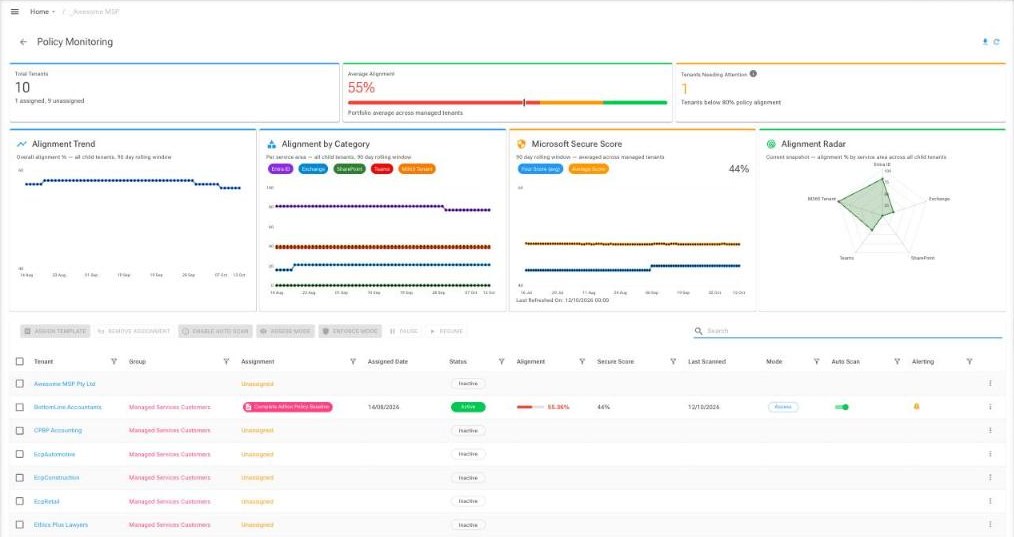
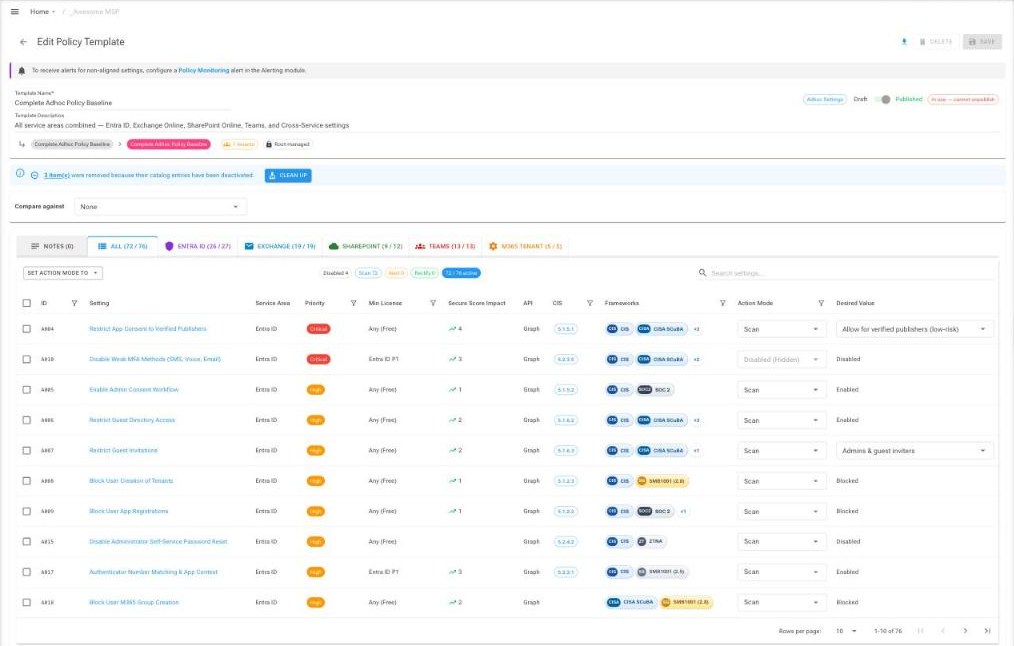
Ad Hoc Policy checks your managed tenants against a baseline of more than 70 Microsoft 365 security and operational settings across Entra ID, Exchange, SharePoint, Teams and tenant wide settings. Each setting is mapped to frameworks such as CIS, Essential Eight and NIST, so you can show clients exactly which controls you are looking after.
- Start from the EcpPro baseline, then tailor it for each type of client
- Choose for each setting whether to scan, alert you when it drifts, or put it right automatically
- Two key safety: a setting is only corrected when it is marked Rectify and the tenant is in Enforce mode
- Policy Monitoring shows alignment trends, alignment by service area and Microsoft Secure Score across your tenants
- Template groups let you assign once and pick up new checks automatically
Coming next: Conditional Access (January 2027), Intune (April 2027) and Defender (July 2027). Each is optional.
Signature ManagementEvery signature, in every tenant, always correct
Consistent, correct email signatures for every mailbox in every tenant.
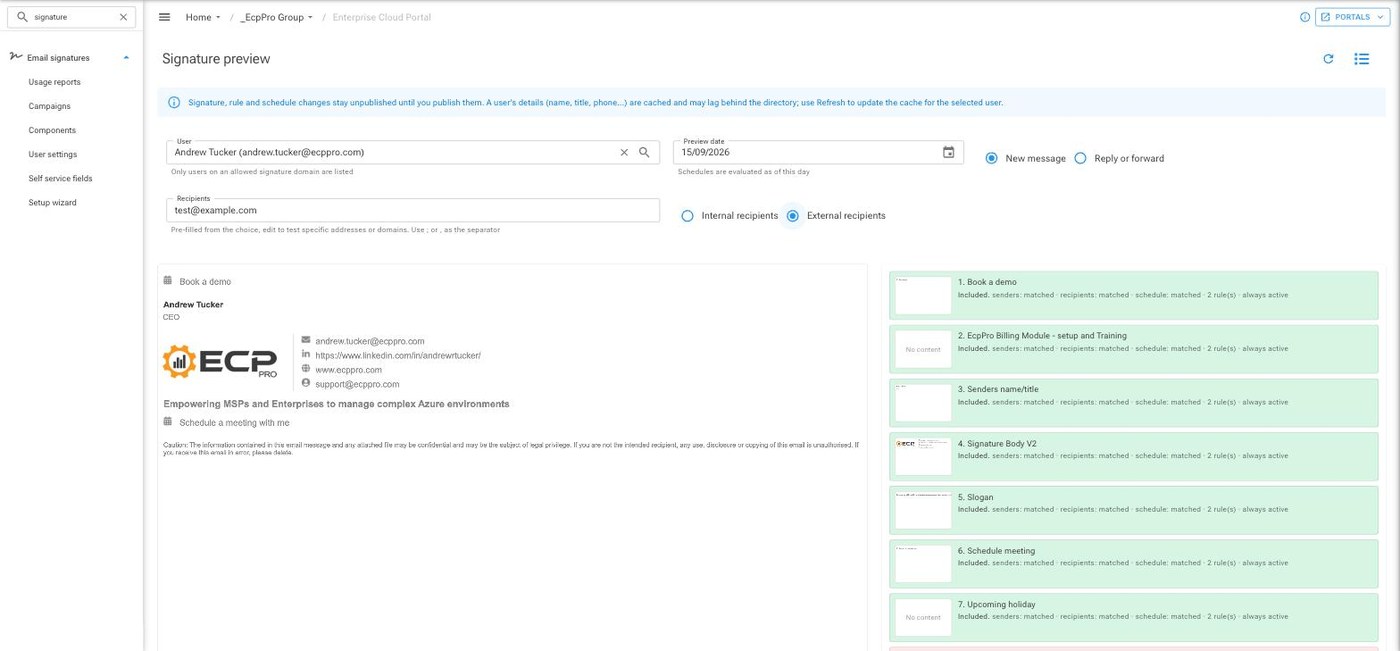
Signatures are built as each message is sent, using the sender’s details from Microsoft 365. Change someone’s job title in Microsoft 365 and their very next email is right, with no templates to edit and nothing to republish.
- Stack signature components with rules for sender, group, internal or external recipients, and new messages or replies
- Schedule seasonal messages and holiday notices by date range or weekly window
- Run banner and one click survey campaigns inside the signature
- Outlook add in for Windows, Mac, web, iPhone and Android, plus server side signing for everything else sent from the mailbox
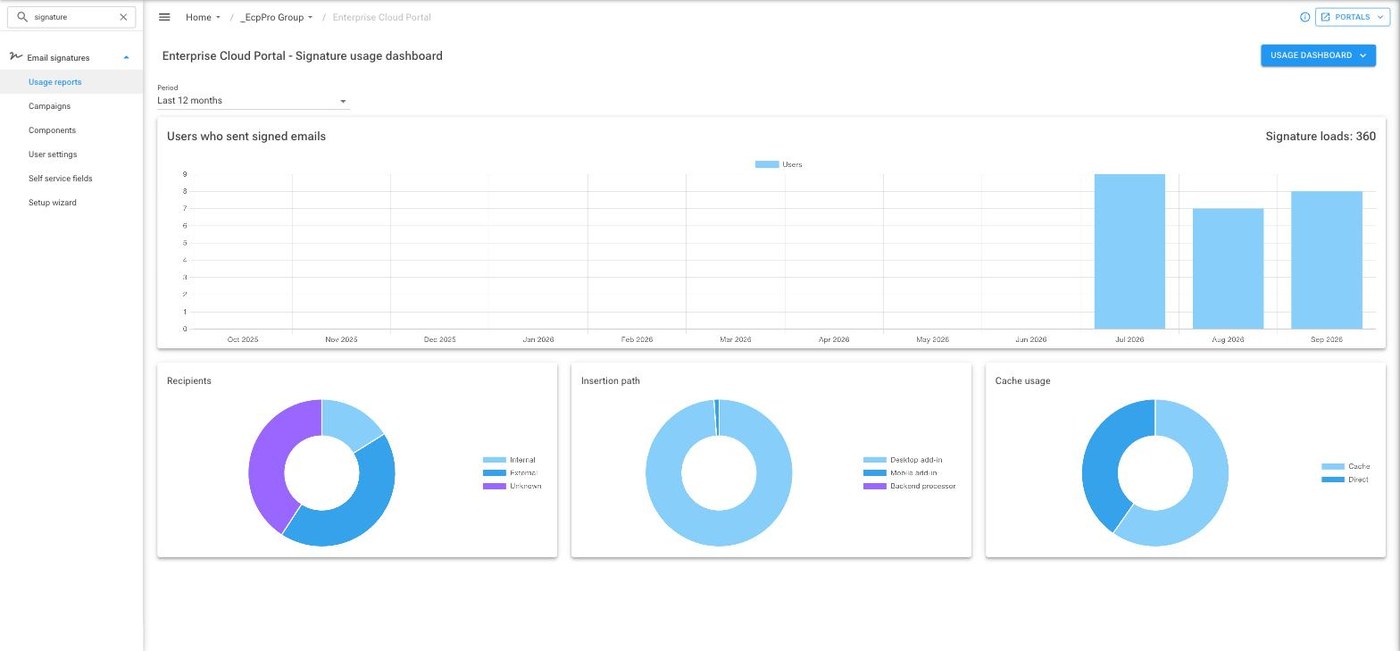
- Usage reporting shows who is sending signed email and how
- One rate for every mailbox, sliding down as your volume grows
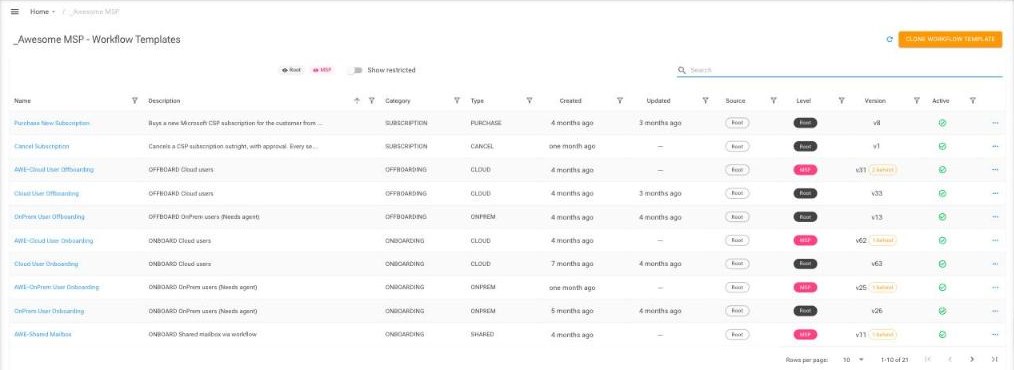
Automation WorkflowsRepetitive admin, done in a few clicks
Turn repetitive admin into a few clicks, with approvals and auditing built in.
- Ready to use workflows for user onboarding and offboarding, purchasing and assigning licences, subscription changes and shared mailboxes
- User management workflows for travelling users, staff on leave, compromised accounts and password resets
- Clone a template and tailor it to the way your team works
- Add approval steps so the right person signs off before a change is made
- Connect to Teams, Rewst or your own API, and post updates to the linked PSA ticket as the workflow runs
Azure Virtual DesktopAVD sessions and host pools, in the same portal
See and manage your clients’ Azure Virtual Desktop sessions without leaving EcpPro.
- View active and disconnected sessions
- Send users a message, log them off or force a log off
- View host pool and session host information
- Review AVD login history and export it to CSV
- A lightweight monitor service on each AVD server, with no firewall changes needed
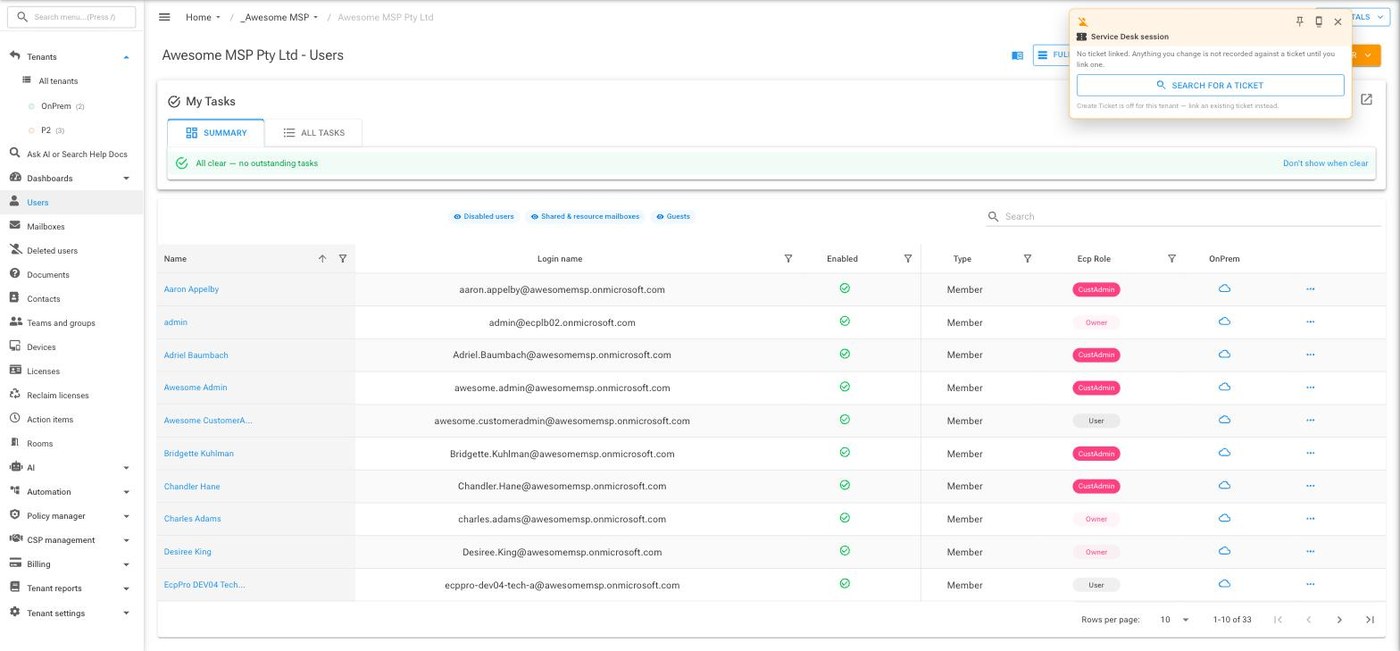
On Prem AD ManagementHybrid clients, managed from one place
Manage your hybrid clients’ on premises Active Directory from the same portal.
Create and update users and groups in EcpPro, and the EcpPro AD Sync Service makes the change in the client’s Active Directory. Entra ID Connect then carries it through to the cloud as usual.
- Create, update, disable, enable and delete users
- Create, update and delete groups, and manage group membership
- Runs as a Windows service in the client’s domain over outbound HTTPS, with no firewall rule changes
- Install with the setup wizard, or roll out unattended through your RMM with the command line installer
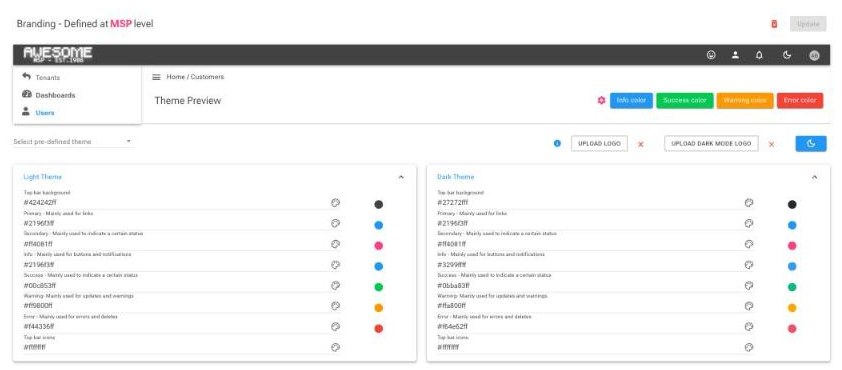
BrandingYour logo and colours across the portal
Make the EcpPro portal look and feel like your own.
- Upload your logo, with a separate version for dark mode
- Start from a predefined theme, then fine tune every colour
- See each change in the live theme preview before you save
- Your team and your clients see your brand every time they sign in
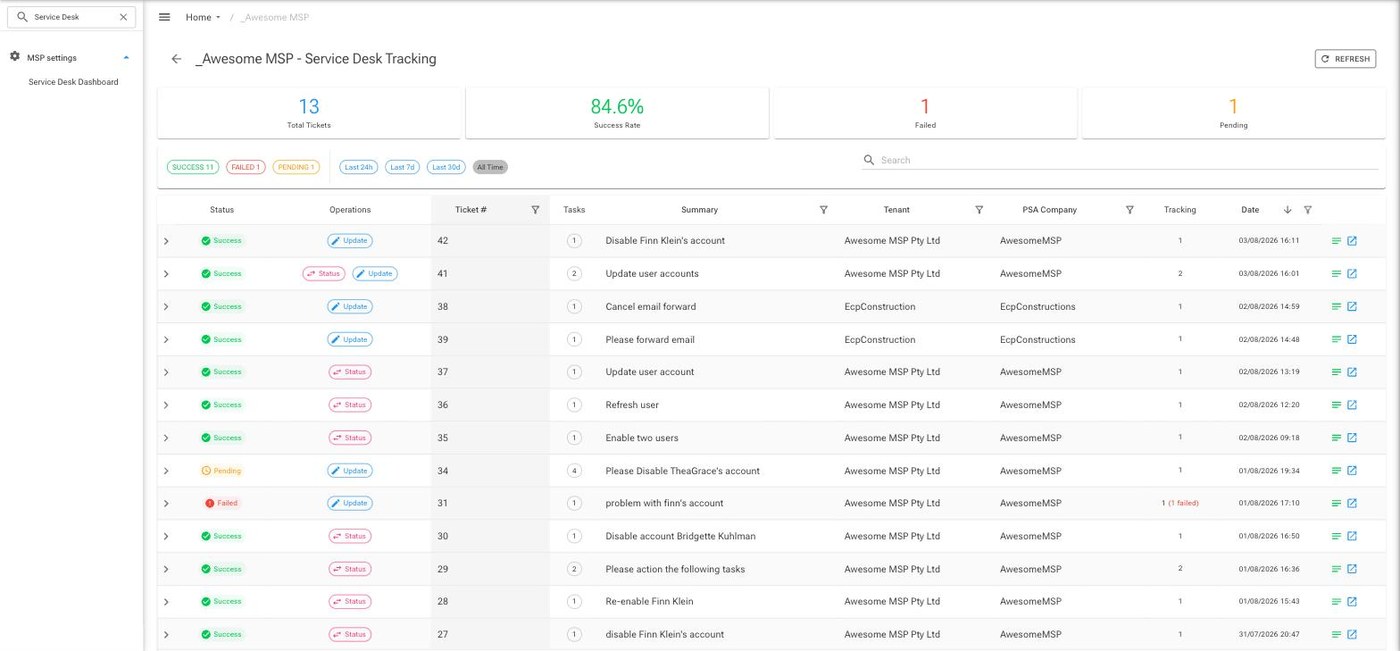
Service Desk IntegrationYour work, recorded against the right ticket
Every change you make in EcpPro, recorded against the right ticket in your PSA.
Link a ConnectWise, HaloPSA or Autotask ticket while you work, and the ticket updates itself with notes, status changes and time entries as each action runs.
- Map tenants to PSA customers in one click with Auto Map
- Search for and link a ticket without leaving EcpPro
- Track every ticket update, with successes and failures at a glance
Prices for each add on are in the Azure Marketplace add on prices (USD) and on the Dicker Data tab (AUD).
Pricing questions
What counts as a user?
On Azure Marketplace plans, anyone with a paid Microsoft licence. On the Dicker Data editions, users in your managed tenants; unmanaged tenants add nothing.
Does the $1,600 cap include add ons?
No. The cap covers the edition only. Add ons are billed separately.
Am I eligible for Dicker Data funding?
Partners transacting over $20,000 a month in CSP through Dicker Data in Australia, or over $10,000 a month in New Zealand, receive $400 a month. Your Dicker Data Account Manager can confirm.
Can I buy through Azure Marketplace?
Yes. Premier Suite 25, 50 and 100 are on Azure Marketplace. Prices are set in USD, and Microsoft bills you monthly in your local currency plus local tax.
Not sure which edition suits you?
We are always happy to walk you through the editions on your own tenants and show you what each one would add for your team.