Repeatable workflows for the work your team does every day
Onboarding, offboarding, licences and subscriptions, run the same way every time, with approvals, scheduling and a run report built in.
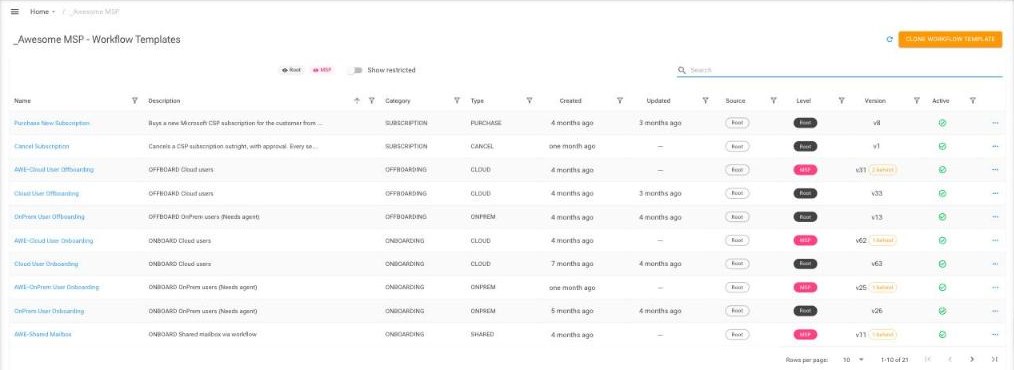
Start from templates built by EcpPro
Clone a template, set it up once, and every technician runs it the same way.
Onboarding
Create a user, assign licences and groups, set a password and send a welcome email. Cloud and on premises.
Offboarding
Disable the account, remove licences, redirect mail and clean up, with optional approval. Cloud and on premises.
Licences and subscriptions
Purchase and assign a licence in one step, add or remove seats, or buy a new subscription from a customisable catalogue.
User management
Travelling user, user on leave, compromised account and password reset, each ready to run in a few clicks.
Shared mailboxes
Create shared mailboxes and manage who has access.
Connect your tools
Post to Teams, trigger Rewst or your own API, and update the linked PSA ticket as the workflow runs.
Set it up once, at the right level
- EcpPro templates. Ready made templates for every workflow type, ready to clone
- Your MSP defaults. Password delivery, approvers, timeouts and which steps are locked
- Tenant groups. Optional defaults for each group of clients
- Each client. Their approvers, licences and groups, with variants such as Onboard Manager or Onboard Case Worker
- At run time. Your technician fills in the details, adjusts any unlocked step and links a ticket
Launch, schedule, approve, report
Launch
Start from the Users page, a user, or a subscription.
Fill in and schedule
Add the details, copy from an existing user, and choose the dates.
Monitor and approve
Track progress and approvals, on the customer side, the MSP side, or both.
Pricing
One charge per MSP covers every tenant. Prices for Azure Marketplace and Dicker Data partners are on the pricing page.
See pricingWorks with the End User Portal
With workflows switched on, your clients can run onboarding for a new starter themselves, through the approval chain you set.
See the portalWatch workflows in action

See a workflow run on your own tenant
We are always happy to show you how workflows would fit the way your team works.